
Via ADO
ActiveX Data Objects (ADO) allow programs to access data from a wide variety of data sources. The most common use of ADO is to query tables in a relational database.
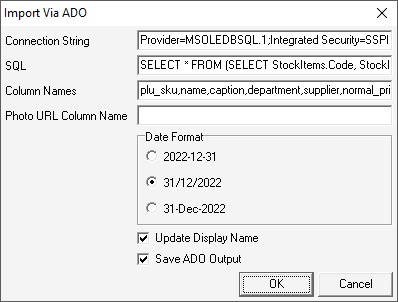
Phototicket uses ADO to collect product information from retail system databases. Phototicket needs three parameters to collect product information:
- A
Connection String. This string is used to make the connection to the data source and usually contains such things as the type if data source, the IP address of the computer that hosts the data, the username and password required to access the data. - An
SQLstatement. This is a statement is written in a format that the data source understands that will return one row for each product in the data source. This statement may include criteria that limits the number of products. For example, we could write an SQL statement that returns only products that have been modified today. - A comma seperated list of Phototicket product
Column Namesthat match the columns for each returned row. The first column name will be used as the unique identifier for each product.
There are four additional parameters that affect the import:
- The
Photo URL Column Name, if specified, tells Phototicket which column name to use to download a photo for the product. - If dates are present in the data,
Date Formattells Phototicket in which format they are in. - This Phototicket
Display Nameis set to the same value asNamewhen a product is first imported. On subsequent imports, theDisplay Nameis only updated if theUpdate Display Nameflag is set. This allows staff to improve the product name for display on tickets, changing pkt to packet, for example, and not having those improvements overwritten on subsequest imports.
The column names that Phototicket can import are:
- name
- caption
- department
- subdepartment
- brand
- supplier
- plu_sku
- barcode
- barcode_128
- qr_code
- article_number
- product_code
- kj
- kj_per_serve
- kj_per_100g
- extra_text
- size
- normal_price
- normal_unit_price
- hide_normal_unit_price
- special_price
- special_unit_price
- hide_special_unit_price
- special_start_date
- special_end_date
- savings_amount
- multibuy_quantity
- multibuy_price
- multibuy_unit_price
- hide_multibuy_unit_price
- was_price
- show_australia_logo
- australia_percent
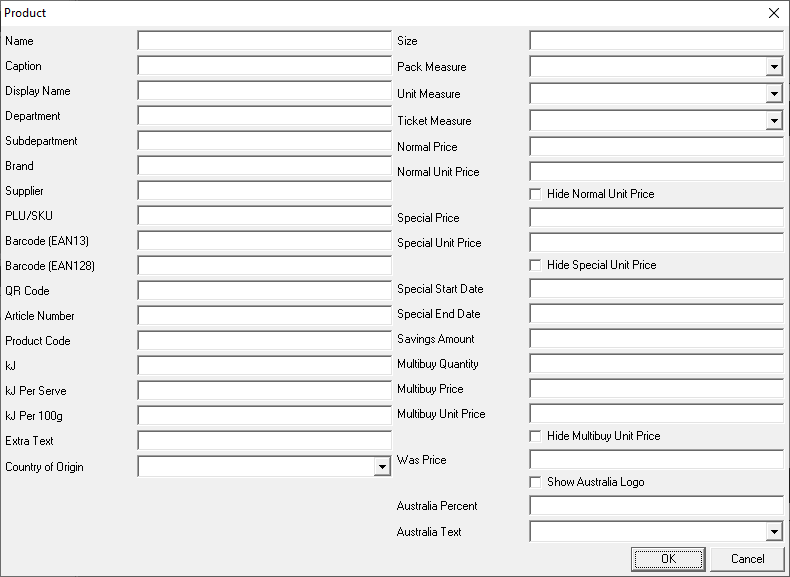
The column names closely match the names in the Phototicket Product form:
Importing Data From IdealPOS
If Phototicket is running on the same computer as IdealPOS, the following settings can be used to import product data:
- Connection String:
Provider=MSOLEDBSQL.1;Integrated Security=SSPI;Data Source=localhost\IDEALSQL - SQL:
SELECT StockItems.Code, StockItems.Description, StockItems.Description2, Departments.Description AS Department, Creditor.Code AS SupplierCode, Price1.Value AS Price, SpecialPrices.Price AS SpecialPrice FROM IPSTransaction.dbo.StockItems AS StockItems LEFT JOIN IPSTransaction.dbo.Departments AS Departments ON StockItems.DepartmentCode = Departments.Code LEFT JOIN IPSTransaction.dbo.Creditor AS Creditor ON StockItems.CreditorID = Creditor.ID LEFT JOIN IPSTransaction.dbo.StockItemsValue AS Price1 ON StockItems.ID = Price1.StockItemID AND Price1.Type = 1 AND Price1.Level = 1 LEFT JOIN IPSTransaction.dbo.SpecialPrices AS SpecialPrices ON StockItems.ID = SpecialPrices.StockItemID - Column Names:
plu_sku,name,caption,department,supplier,normal_price,special_price